Beyond Booking Flights: How EAs Make Travel Seamless


Table of contents
The Path to Becoming an Athena Assistant
Only the top 1% of applicants make it to the Athena Bootcamp – an acceptance rate more exclusive than Harvard University.
Many people think having an assistant means someone who books flights and forwards the confirmation.
That is the bare minimum. The real value shows up in the detailed parts of travel. Immigration forms. Tight connections. Gate changes. The weird moment when you are standing in a terminal holding a lukewarm coffee, trying to decide if you have time to sprint to a lounge you have never been to.
Here are a few travel stories from Athena clients where their EAs quietly turned all of that into something almost boring. In the best possible way.
1. The travel playbook
Family of four. Two kids. Multi-city Taiwan trip.
The last time this Athena client traveled, they learned the hard way that Taiwan travel cards needed to be filled out online beforehand. Classic panic ensued: juggling phones, passports, and cranky kids in the immigration line, hammering their details into a government site over bad airport Wi-Fi.
This time, their EA sent a calm WhatsApp note:
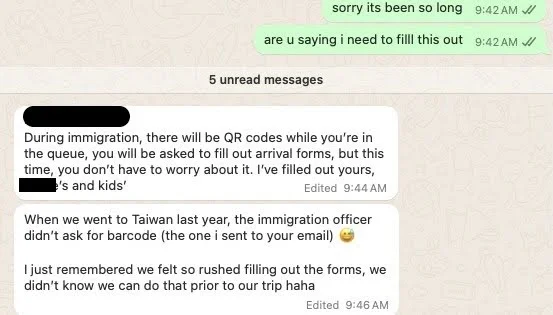
Behind that message the EA:
- Researched the latest Taiwan entry rules on the official Taiwan immigration portal
- Pre-filled arrival forms for all four travelers
- Dropped the PDFs into a trip packet along with boarding passes, hotel confirmations, and a quick packing list
- Explained exactly what to expect in the immigration line
Result: no mad scramble in the queue. Just a tired but happy family walking straight through, everything already taken care of.
2. Travel summary via email
One Athena client was flying from Victoria to San Francisco for work. Nothing dramatic, but lots of moving parts.
A couple days before departure, this email hit his inbox:
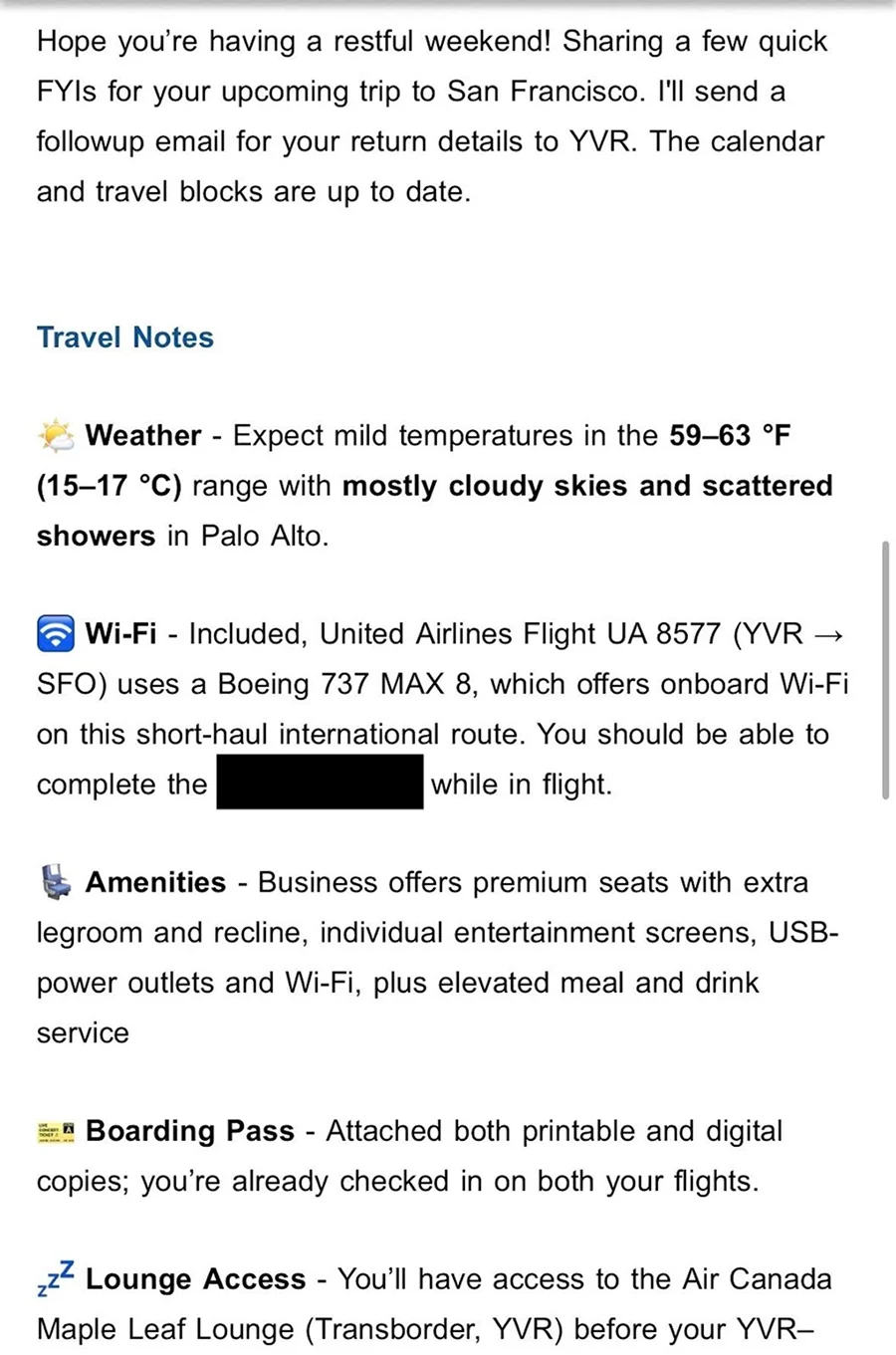
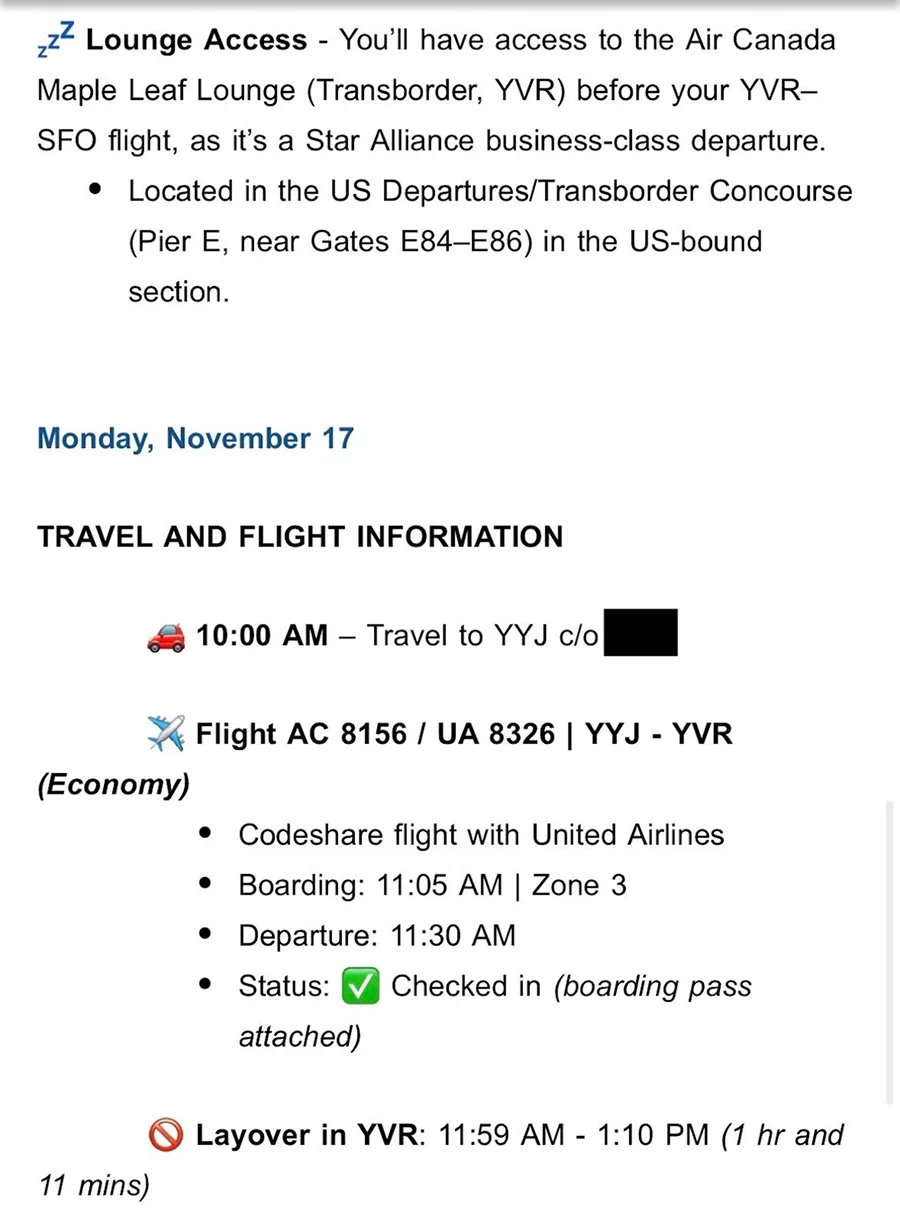
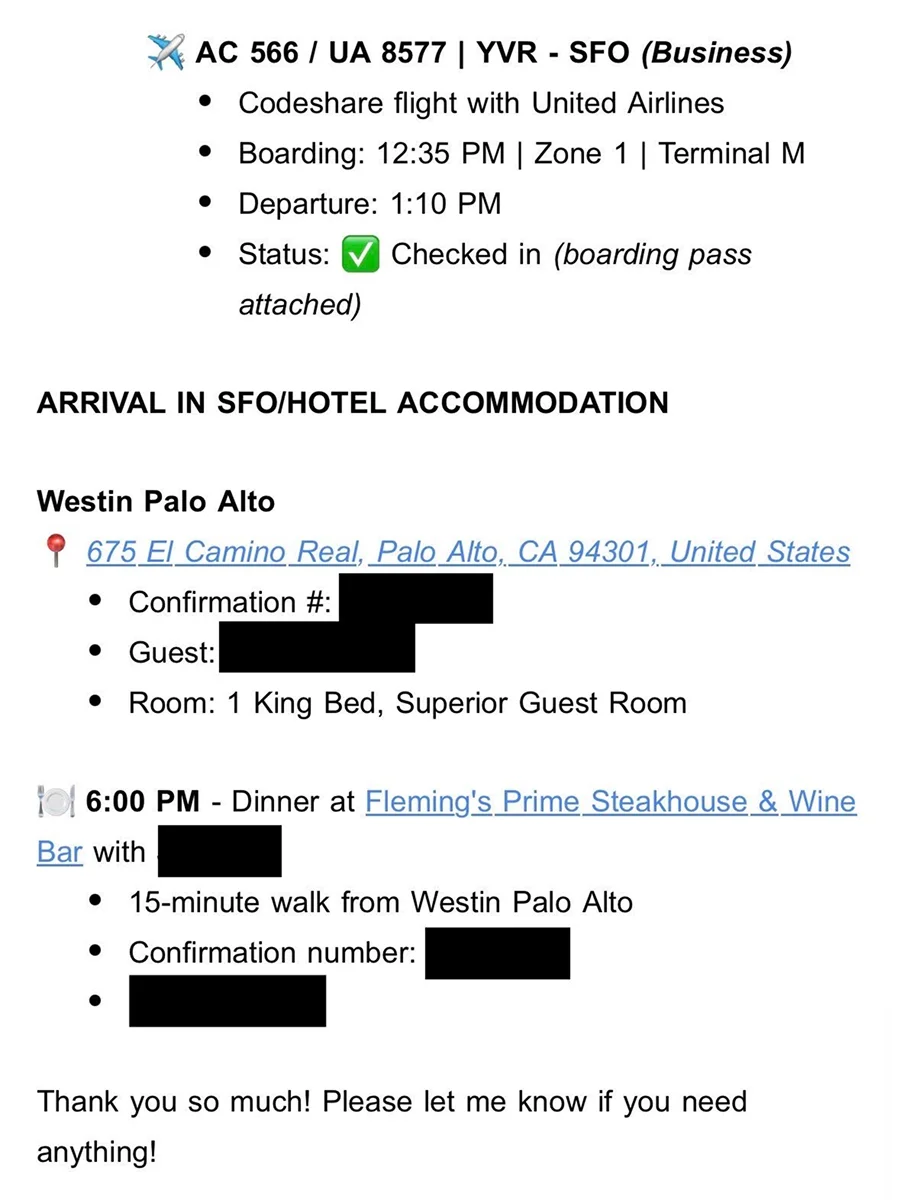
Then it got very specific.
Travel notes
- Weather: 59 to 63°F in Palo Alto, mostly cloudy with scattered showers, with a quick Weather.com link in case he wanted to double check on the day itself.
- Wi-Fi: confirmed on his exact aircraft type so he could finish business modules during the flight.
- Cabin details: what business class on that route actually includes, from seat type to USB power
Next came the play-by-play for the day:
- 10:00 am - car to YYJ
- Flight 1 with boarding time, zone, and a clear note that he was already checked in
- Layover length spelled out so he knew it was tight, but doable
- Flight 2 with terminal info, boarding group, and status
Then the ground side:
- Westin Palo Alto address, confirmation number, and room type
- Dinner plans at Fleming's with time, confirmation number, and a Google Maps link already preloaded with walk time and directions
Most people would piece this together from six emails, an airline app, and a calendar event they forgot to update.
Steven opened a single email and saw his whole day: door to hotel room to steak. No searching. No guessing.
3. The airport map that saves 30 to 60 minutes
One of Athena’s clients shared a small detail that makes a huge difference.
On his travel days, his Athena EA sends him:
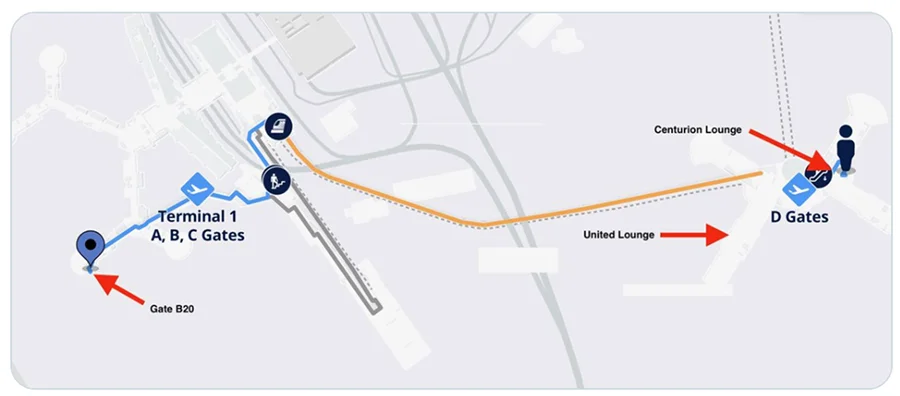
- A simple airport map
- Every lounge he can access, clearly marked
- His gate and walking time from lounge to gate
- Terminal info and live flight updates pulled from FlightAware
All of this before he even leaves for the airport, giving him a complete picture of his day in transit.
He says this saves him 30 to 60 minutes of wasted time and drama on every trip.
It is not some fancy system or expensive tool. It is just someone doing the obsessive pre-work you would do for yourself, if only you weren’t already running a business while traveling.
4. From economy to business
Another client, Mabel, used to book flights the way most people do. Open a tab, search for a date, pick something in the middle of the price range, and forget about it.
Her EA took one look at that habit and built a tiny personal “fare desk” around her.
They set up:
- Google Flights alerts on her regular routes, with flexible date ranges
- Hopper and Skyscanner tracking on the big international trips, using flexible month searches for cheaper days
- Subscriptions to newsletters, like Going, so mistake fares and quiet promos did not rely on chance scrolling
On the points side, they noticed she had balances scattered across three cards and a couple of airline programs. All decent, none powerful on their own.
So they streamlined her setup:
- One primary card for flexible bank points that transfer to multiple airlines, similar to Chase Ultimate Rewards or Amex Membership Rewards
- One card chosen specifically for lounge access and elite style perks like priority boarding and free bags
That meant:
- Nearly all travel and dining spend flowed into flexible points that could be pointed at the best airline for any given trip
- They could transfer into airline sweet spots, instead of cashing out at weak fixed rates
- Lounge access came from the card itself, not random day passes bought on the way to the gate
The first time this system paid off, a regular economy ticket on a long haul work trip quietly turned into a lie flat business class seat.
From Mabel’s point of view, it looked like her flight “magically” upgraded. In reality, it was a spreadsheet, alert systems, and someone who enjoys reading the fine print on award charts.
5. The brain that remembers every preference
The best EAs are like human versions of your “travel profile,” but one that actually stays up to date.
One executive we support has a long list of preferences that he never wants to think about:
- Aisle seats on short flights, window seats on long ones
- Specific seats on certain aircraft that have more legroom
- Strong feelings about pillow type, floor level, and how far the room is from the elevator
- A soft rule that all hotel gyms must have free weights heavier than 50 pounds
His EA turned this into a living system. Behind the scenes:
- A seating preference profile per airline, linked to his frequent flyer numbers
- A log of past flights noting which seats he liked or hated
- A hotel preferences sheet that includes room type, floor, view, minibar, wake-up routines, and late checkout habits
- A restaurant log tagged by cuisine and proximity to common meeting locations
Before every trip he gets a short briefing. It covers check-in info, lounge access, flight tips, car details, and confirmed hotel customizations. He is told what will happen, not asked what he wants.
The result is the feeling of being “known” by the system. Planes, vehicles, and hotel rooms just show up the way he likes them, without anyone having to send a “hey, aisle if possible” text ever again.
6. The travel desk for an entire leadership team
Individual trips are nice, but where EAs really shine is when they act as a travel desk for a whole team.
For one leadership offsite, the EA group ran travel for a dozen people going to the same city from different places.Here is what they quietly handled:
- Tracked frequent flyer numbers and status for each executive, so upgrades and free bags were automatically used
- Pre-selected seats according to everyone’s preferences and height
- Booked airport transfers, verifying vendor safety, and dropped driver info right into the calendar invites
- Ensured hotel rooms had proper workspaces, early check-in for red-eye arrivals, and late checkout for afternoon departures
- Curated nearby restaurants that could handle dietary restrictions and private rooms for real conversations, often cross checked with OpenTable and Google Reviews
- Built a shared interactive itinerary with flights, cars, hotels, meeting locations, restaurant pins, weather, and emergency contacts all in one place
- Collected post-trip feedback and updated each exec’s travel profile to make future trips even smoother
There was no single “wow” moment. The feedback afterward was mostly variations of “I did not have to think about anything except the meetings.” That is exactly the point.
If you like this, here is the next step
If you want to try this level of support for your own travel, we wrote a separate post on how to delegate trips three different ways, from light touch to fully handled. You can read it here: Travel itineraries: 3 ways to delegate.
What great EAs actually do on travel days
Across these trips there is a simple pattern.
A great EA:
- Thinks about the whole day, not just the flight number
- Translates airline and airport jargon into plain English
- Pre-plays the annoying parts of the journey in their head and removes as many as possible
- Pushes everything into the tools you already use: calendar, inbox, WhatsApp, not yet another travel app you forget to open
Travel will always be tiring. Flights may be delayed. Kids may spill juice at exactly the wrong time.
The difference is that your travel day stops feeling like a surprise group project and starts feeling like something quietly handled in the background while you focus on the reason you are flying in the first place.

You might also like


.webp)






No items found.
